
Traces and diagnostics
tui-test provides two complementary layers of failure evidence: session-wide traces that record operations, screen history, and asciinema output across an entire session, and per-assertion failure diagnostics attached directly to errors and optional failure directories.
Interactive trace viewer
Section titled “Interactive trace viewer”When a traced session fails, tui-test writes a standalone trace.html report alongside trace.md, trace.json, timeline.json, and session.cast. In the example below, a deployment dashboard renders "Deployed" in red (#ff6b6b) while the test asserts a green foreground:
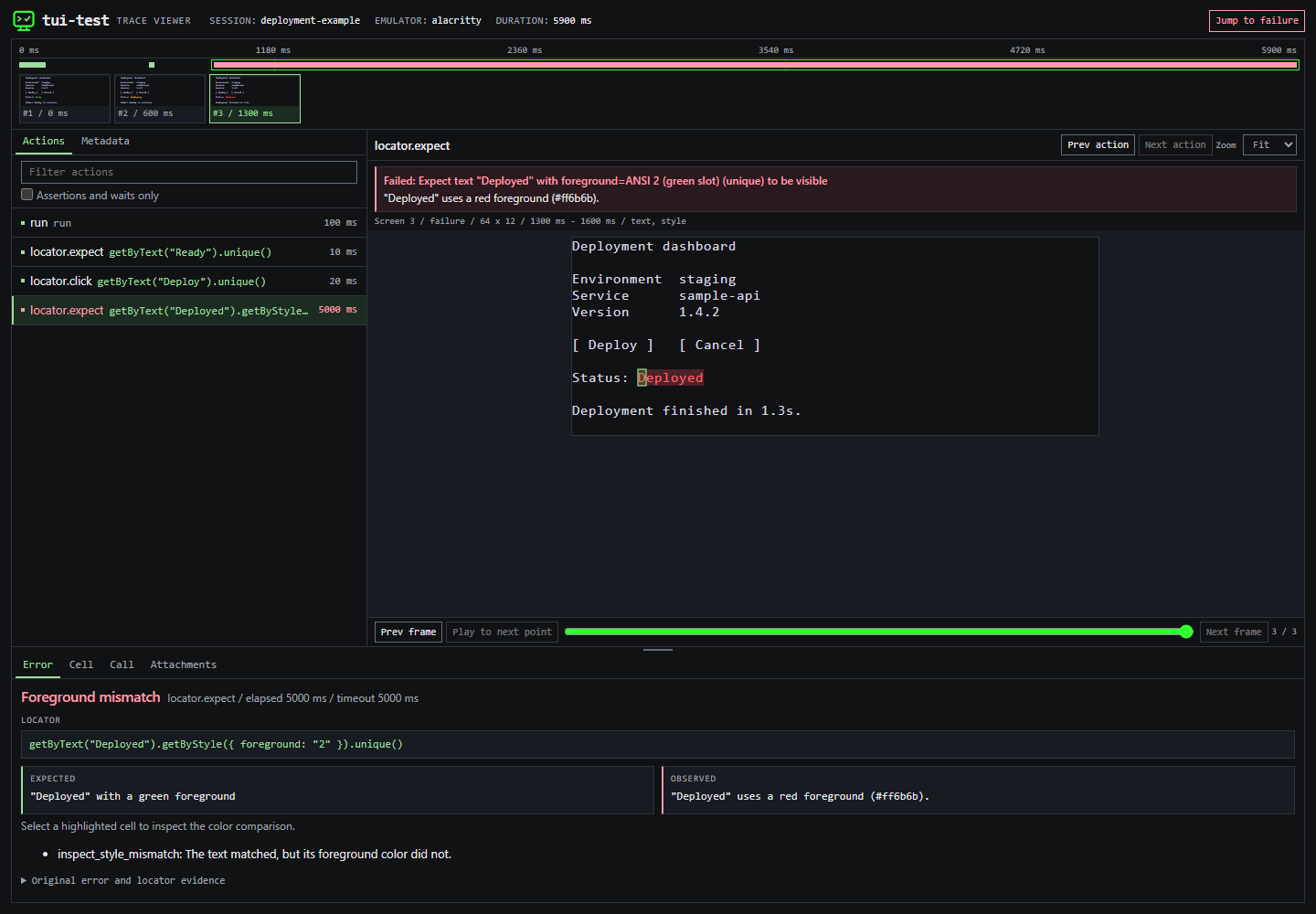
Inside trace.html you can step through every recorded operation, scrub the terminal frame filmstrip before and after the failure, click individual cells to compare expected vs. actual styles and OSC 8 links, and download or replay the embedded session.cast.
Human reviewers usually open trace.html in a browser. Coding agents and CI triage tools should read trace.md first and inspect trace.json and timeline.json when deeper cell or stage diagnostics are needed.
Enable session traces
Section titled “Enable session traces”Configure tracing before calling open or run. Modes are "off" (default), "on-failure", and "on" (default directory: .tui-test/traces).
const terminal = TuiTest.ephemeral("deploy", { trace: { mode: "on-failure", directory: "artifacts/traces" }, context: { diagnosticContext: { suite: "deploy" } },});from tui_test import ExecutionContext, TuiTest
terminal = TuiTest.ephemeral( "deploy", trace={"mode": "on-failure", "directory": "artifacts/traces"}, context=ExecutionContext(diagnostic_context={"suite": "deploy"}),)use std::collections::BTreeMap;use tui_test::{ExecutionContext, Session, TraceMode, TraceOptions};
let context = ExecutionContext { trace: Some(TraceOptions { mode: TraceMode::OnFailure, directory: "artifacts/traces".into(), }), diagnostic_context: BTreeMap::from([("suite".into(), "deploy".into())]), ..Default::default()};let terminal = Session::new("deploy").with_execution_context(context);terminal, err := tuitest.Ephemeral("deploy", tuitest.ClientOptions{ Trace: &tuitest.TraceOptions{ Mode: tuitest.TraceOnFailure, Directory: "artifacts/traces", }, Context: &tuitest.ExecutionContext{ DiagnosticContext: map[string]string{"suite": "deploy"}, },})[trace]mode = "on-failure"directory = "./artifacts/traces"To finalize a trace outcome explicitly before closing the session (for example when an external assertion outside tui-test fails), call finishTrace(true) (await terminal.finish_trace(failed=True) in Python, terminal.FinishTrace(true) in Go, Operation::FinishTrace in Rust, or tui-test trace finish failed on the CLI). Go’s tuitesttest.New helper reports t.Failed() automatically during cleanup.
Per-assertion failure diagnostics and artifacts
Section titled “Per-assertion failure diagnostics and artifacts”Every structured assertion failure attaches FailureDetails directly to the language error (error.details in JS/Python, err.Details on *tuitest.Error in Go, and TuiTestError methods in Rust) so callers never need to parse error message text. Details include operation timing, locator evaluation stages and candidate cell mismatches, process exit state, runtime metadata, caller diagnosticContext key-value pairs, and up to screenHistoryLimit recent distinct screens (default 10, maximum 50).
Enable per-failure directory exports when you want standalone files written immediately at each failing assertion:
| Mode | Exported files |
|---|---|
none |
Structured error details in memory only; no files written. |
text |
failure.json, failure.md, and current.txt. |
html |
Standalone failure.html viewer with embedded JSON and SVG evidence. |
all |
All text and html files plus current.svg and timeline.json (default when a directory is set). |
Add includeRecording: true (--failure-artifact-recording on the CLI) to copy the automatic asciinema cast up through the failure boundary. On the CLI, pass --failure-artifacts DIR, --failure-artifact-mode MODE, --diagnostic-context KEY=VALUE, --operation-name NAME, or --context-file PATH.
If writing an optional diagnostic file fails (for example on a full disk), tui-test preserves the original assertion error and records the write error inside the attached FailureArtifactRef (error.artifact / err.Artifact). Always review traces and failure directories before sharing them externally, as they capture terminal text, window titles, locator queries, and recordings; avoid placing secrets in diagnosticContext.